Text2Event Gmail Add-on — Now on Desktop, Android, and iOS
Published: September 26, 2026
One Button, Every Gmail
Our Chrome extension already added a one-click calendar button to Gmail desktop. The catch: it only works in the Chrome browser, on a computer. If you read email mostly on your phone, that button was never there.
The new Text2Event Gmail add-on fixes that. It's a proper Google Workspace add-on, so the same "Create event from this email" button now shows up in Gmail on desktop, the Android Gmail app, and the iOS Gmail app — one install, every device.
See It In Action
This short video walks through installing the add-on and turning an email into a calendar event on both desktop and mobile.
How to Create a Calendar Event From Gmail
Step 1: Install the Add-on
Open the Text2Event listing on the Google Workspace Marketplace and click Install. It works with personal Gmail accounts and Google Workspace accounts alike.
Step 2: Open Any Email
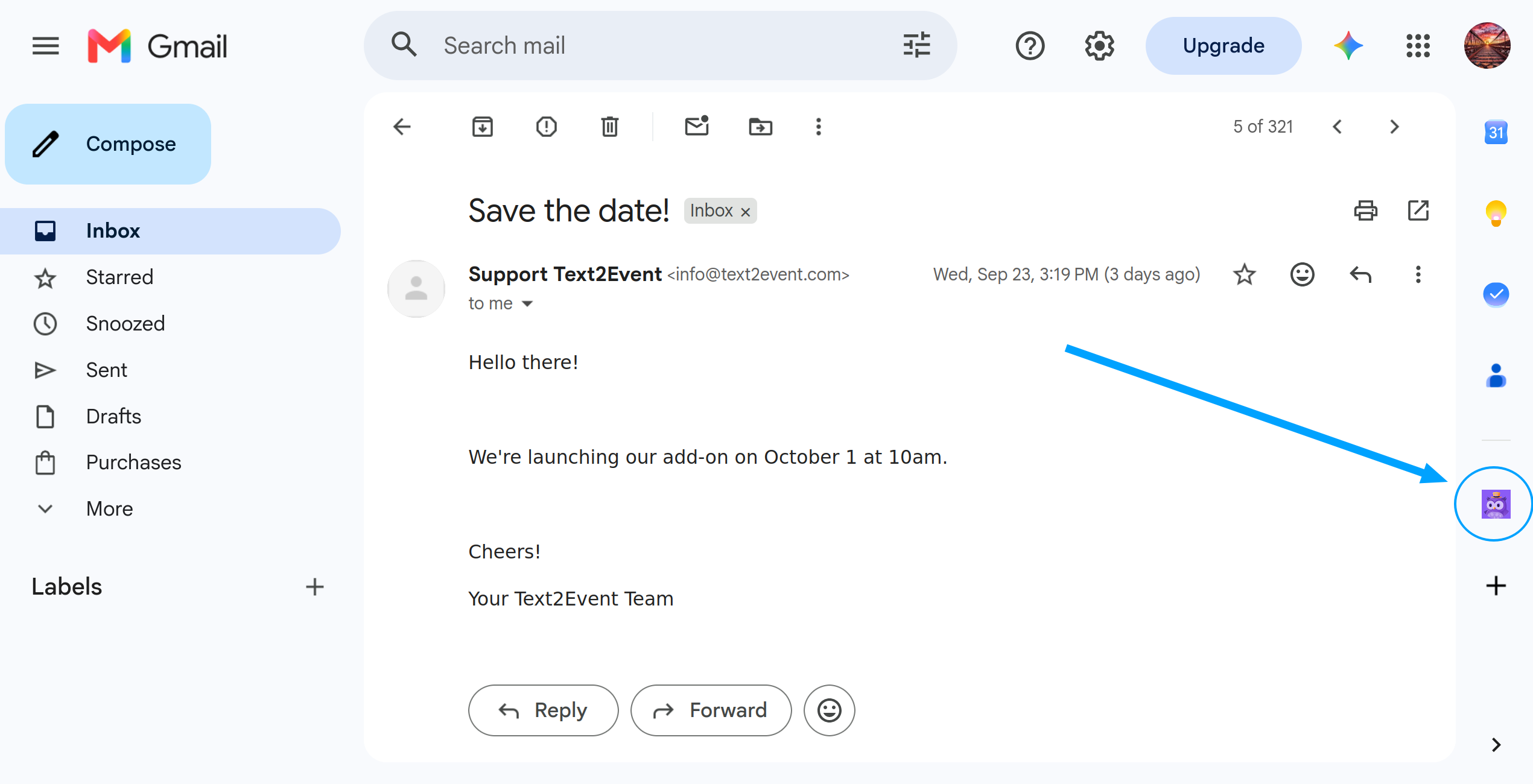
On desktop, open an email and look for the Text2Event icon in Gmail's right-hand side panel.
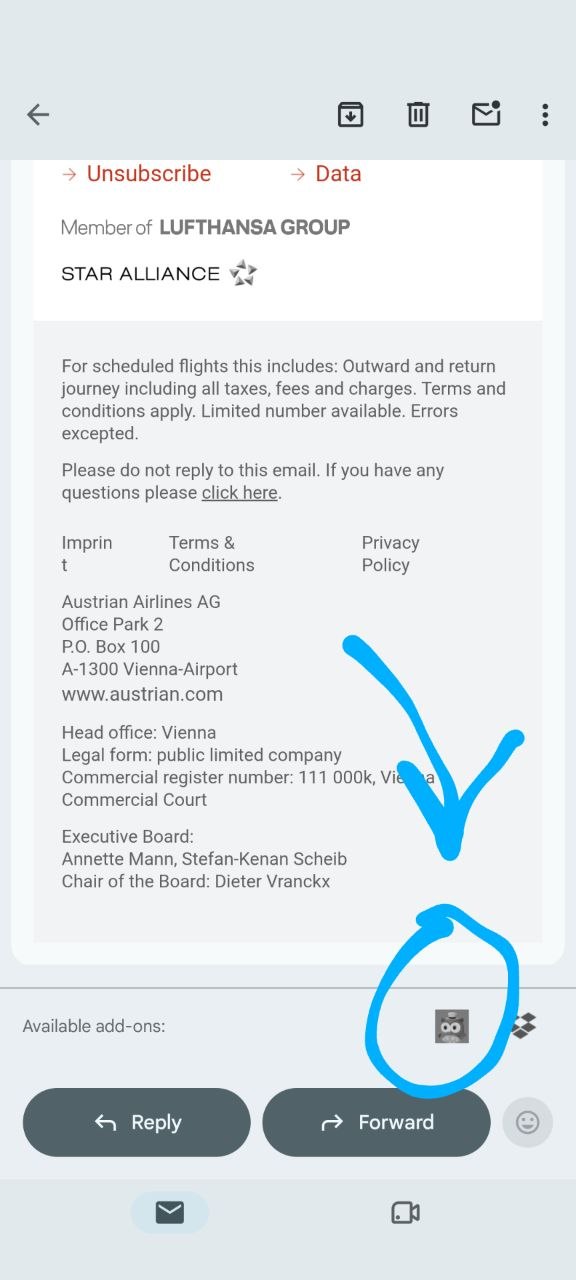
On Android or iOS, open the email and scroll all the way to the bottom — past Reply and Forward — to find it among the available add-ons.
Step 3: Tap "Create Event From This Email"
Text2Event reads that one open email — subject and body — and extracts the date, time, location, and any recurrence.
Step 4: Add It to Your Calendar
You'll get buttons for Add to Google Calendar, Outlook, and a direct .ics download, so the event opens correctly no matter which calendar app you use. If you're signed in to Text2Event Pro with a matching email, the event syncs to your connected Google Calendar automatically instead — no buttons to tap at all.
Free usage is rate-limited, and if an email describes several events, only the first gets calendar links for free — a Pro subscription unlocks the rest.
Why It's Different From the Chrome Extension
- 📱 Works on Android and iOS — not just Gmail desktop in Chrome
- 🌐 One add-on, every Gmail — desktop, mobile web, and both mobile apps show the same card
- 🔒 Only the open email — nothing else in your inbox is read, and no calendar-writing permission is requested
- 📅 Works with any calendar — Google Calendar, Outlook, or a plain .ics file
- ⚡ Pro sync built in — matching Text2Event Pro accounts get events added to Google Calendar automatically
More Ways to Turn Email Into Calendar Events
Prefer copy-paste over an add-on? Our guides for creating a Google Calendar event from email and creating an Outlook Calendar event from email cover the plain web-app flow, which works on any device with no install at all.
Try It Now
Install the Gmail add-on, open an email with a date in it, and tap the button — your event is ready in seconds, on whichever device you're on.
No signup • Free (rate-limited, single event) • Works on desktop, Android, and iOS
Gmail Add-on FAQs
- Q: What does the Text2Event Gmail add-on do?
- A: It adds a "Create event from this email" button to Gmail. Open any email, tap the button, and Text2Event reads that email's subject and body and turns it into a ready-to-save calendar event — no copy-paste.
- Q: Does the Gmail add-on work on mobile?
- A: Yes. That's the difference from our Chrome extension. The add-on runs on Gmail desktop (web), the Android Gmail app, and the iOS Gmail app — Google renders the same card natively on all three.
- Q: How is this different from the Chrome extension?
- A: The Chrome extension adds a calendar button to Gmail inside the Chrome browser only, on desktop. The Gmail add-on is a Google Workspace add-on, so it also shows up in the Android and iOS Gmail apps — useful if you check email mostly on your phone.
- Q: How do I install the Gmail add-on?
- A: Open the Text2Event listing on the Google Workspace Marketplace and click Install. It'll appear in Gmail's right-hand rail on desktop, and in the add-ons tray on the Android/iOS Gmail apps.
- Q: Does the add-on need access to my whole inbox?
- A: No. It only reads the one email you have open when you tap the button. It doesn't scan your inbox, and it doesn't get any Calendar-writing permission either — it hands you Google Calendar, Outlook, and .ics links to add the event yourself with one more tap.
- Q: Do I need a Text2Event account to use it?
- A: No, it works right away without signing in. If you do have a Text2Event Pro account under the same email as your Gmail account, events sync straight to your connected Google Calendar automatically instead of showing you links to tap.
- Q: Is the Gmail add-on free?
- A: Yes, installing it and creating events with it is free, with a couple of free-tier limits: requests are rate-limited, and if an email contains multiple events, only the first one gets calendar/download links for free — creating all of them needs a Text2Event Pro subscription.
- Q: Does the free tier have any limits?
- A: Two. Free usage is rate-limited, and multi-event emails (like a multi-day itinerary) only unlock the first event's calendar links for free — the rest need a Pro subscription. A signed-in Pro account removes both limits.